
The AI Newsroom: Moving From “Prompt Engineering” to “Flow Engineering”
I am no expert but most people build AI automations the way they use ChatGPT: they write one giant prompt and hope for the best.
“Research AI trends, write a summary, check the spelling, and format it as HTML. Oh and don’t make mistakes!”
This is the equivalent of hiring a brilliant writer and forcing them to also be your researcher, editor, and web developer. They might do an okay job, but eventually, they will burn out, break the code or break you.
To build professional-grade automations in n8n, we need to stop thinking about “Prompts” and start thinking about “Flow Engineering.” You don’t need a smarter model; just be smart at using it.
In this guide, I’ll show you how to architect an “AI Newsroom”. A multi-agent system where every node has a specific job, including a “Reflexion Loop” where the AI critiques its own work before you ever see it.
The Architecture: Meet Your Staff
Instead of one “Super Brain,” we are going to hire a team of four specialized agents.
1. The Scout (The Filter)
The Node: Schedule Trigger → AI Agent (GPT-4o-mini)
Every newsroom needs someone monitoring the wires. In n8n, this starts with the Schedule Trigger.
The Schedule Trigger This node is your workflow’s alarm clock. While you can set simple intervals (e.g., “Every Hour”), professional flows often use Cron Expressions for precision (e.g., 0 9 * * 1-5 to run only on weekdays at 9 AM). Docs: Schedule Trigger Node
The Strategy: Don’t waste your credits reading junk. Use a “cheap” model like GPT-4o-mini as your Scout. Its only job is to scan RSS feeds or emails and answer one binary question: “Is this relevant to our audience?”
- If NO: The workflow stops here.
- If YES: Pass the topic to the Senior Reporter.
2. The Senior Reporter (The Researcher)
The Node:AI Agent + Tavily Tool Once a topic is approved, we need facts. If you ask a standard LLM to write a news article, it will hallucinate. We need to give it access to the internet.
Technical Sidebar: The Tavily Node Tavily is a search engine built specifically for AI agents. Unlike Google, which gives you blue links, Tavily returns raw, machine-readable text and can scrape content from URLs automatically.
Tip: In n8n, add Tavily as a Tool connected to your AI Agent node, not just as a standalone step. This allows the Agent to decide when it needs to search and when it has enough info. Docs: Tavily Integration
The Strategy: The Reporter’s prompt should be strict: “Write a draft in Markdown. Focus on facts. Do not worry about HTML formatting.” This separation of concerns keeps the writing sharp.
3. The “Mean” Editor (The Critic)
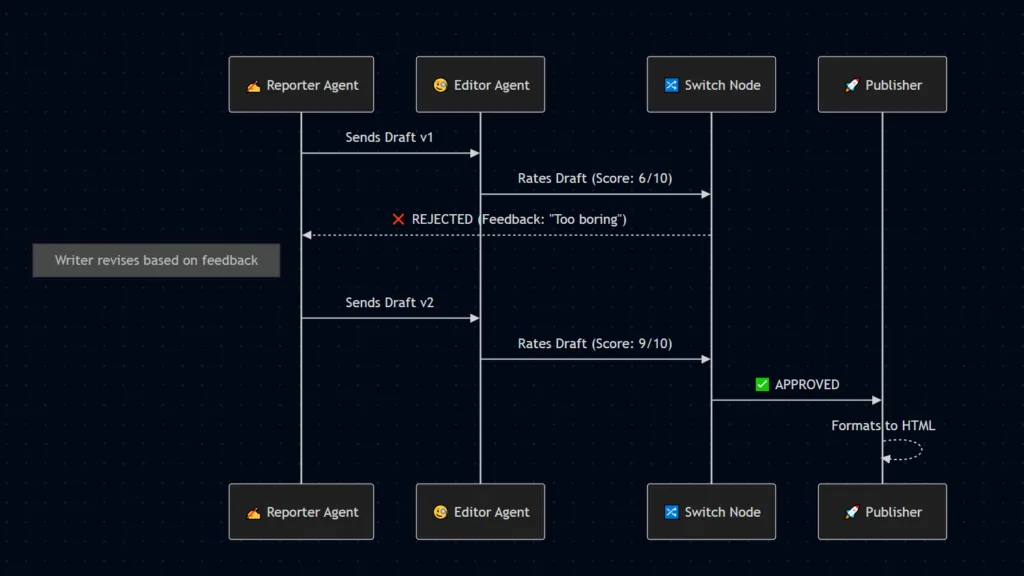
The Node:AI Agent → Switch Node (The Reflexion Loop) This is the “Secret Sauce” most automations miss. In a real newsroom, no writer publishes without an editor’s approval. We can build this logic using a Reflexion Loop.
We create an “Editor Agent” with a nasty persona: “You are a harsh critic. Rate this draft 1-10. If it is boring or sounds like AI, list the specific changes needed.”
The Switch Node The Switch Node (formerly the IF node) is the traffic cop. We route the workflow based on the Editor’s score.
- Path 1 (Score < 8): Route the data backwards to the Reporter Agent. We inject the Editor’s critique as new context, forcing the Reporter to rewrite the draft.
- Path 2 (Score > 8): Proceed to the Publisher.
- Docs: Switch Node
This loop ensures quality control happens automatically. You only receive the final, polished draft.
4. The Publisher (The Formatter)
The Node:Loop Over Items → HTML Agent Finally, we need to ship the content. Whether it’s an email or a WordPress blog, we need clean code.
Loop Over Items If your Scout found 5 different news stories, you can’t just dump them all into one email. The Loop Over Items node allows you to process each approved story individually—formatting them one by one—before aggregating them into a final newsletter. Docs: Looping in n8n
The Strategy: The Publisher Agent takes the approved Markdown text and applies the style.
Build Essentials
1. The Trigger – You can use a scheduled Trigger
2. Tavily Node – Would be tasked to find suitable topics
3. Topic Approval – You can append the topics to a sheet for manual approval or you could task an AI Agent Node to do this
4. Research Information- Once a topic is ready, use another Tavily node to research content for the topic. You can tweak where the data comes from.
5. Script – Task another AI agent to build the script based on the information found
6. Save – Finally you can either append the script to another sheet for approval or post directly to a blog or any other outlet.
Conclusion: You Are the Manager, Not the Creator
When you move from a linear workflow to a Newsroom Architecture, your role changes. You stop prompt engineering specific responses and start engineering the flow of information.
If the articles are boring? You tweak the Scout. If the facts are wrong? You check the Reporter’s Tavily settings. If the tone is robotic? You make the Editor meaner.
This is the future of automation: Systems that correct themselves so you don’t have to.